> ## Documentation Index
> Fetch the complete documentation index at: https://basilcheatsdocs.org/llms.txt
> Use this file to discover all available pages before exploring further.
# Ancient R6
How to setup our Ancient R6 cheat & how to fix common errors.
Make Sure To Follow The Anti-Virus Setup First!
1. Run the loader.
2. Untick the Spoofer (R6 rarely HWID bans and it will cause a higher ban risk along with needing to disable TPM and or other requirements).
3. Press the sonar shortcut key then click Load & launch the game once the loader closes after it finishes downloading data. **Menu key: Insert.**
Follow the SteelSeries Sonar Overlay Setup part of the guide for this part.
## Error Code Fixes
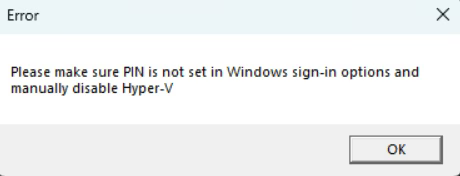 "Please make sure PIN is not set in Windows sign-in options and manually disable Hyper-V" Error.
1. Open windows search and type "Sign-in Options", then open it in settings.
2. Find the setting below and make sure it is disabled.
"Please make sure PIN is not set in Windows sign-in options and manually disable Hyper-V" Error.
1. Open windows search and type "Sign-in Options", then open it in settings.
2. Find the setting below and make sure it is disabled.
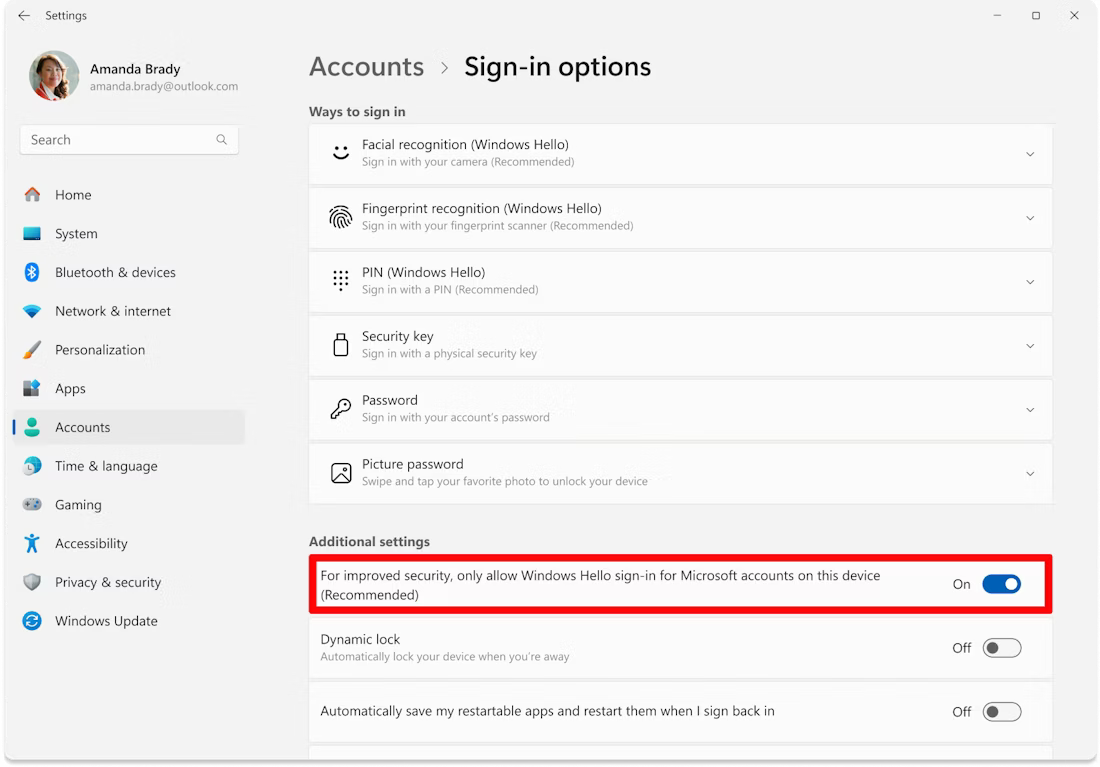 3. Click on PIN (Windows Hello), and ensure it is NOT SET, if it is, then remove your PIN and make sure a password is set.
4. Download & run this file (your PC should restart if left open, if it doesnt then manually do so): [https://gofile.io/d/rpoH9k](https://gofile.io/d/rpoH9k)
Failed to allocate/map memory:
\> 1. **Make sure that you have 16GB or more RAM in your PC.**
\> 2. **Disable everything in Task Manager -> Startup and then try again after PC restart.**
\> 3. Make sure that loader located on PC and not on cloud space (e.g OneDrive, \[[Mega.nz](http://Mega.nz)]\([http://Mega.nz](http://Mega.nz))).
\> 4. Download [AutoRuns](https://learn.microsoft.com/en-us/sysinternals/downloads/autoruns) and disable **everything that related to Microsoft/Windows/CurrentVersion/Run. But DO NOT touch anything else.**
Run DISM repair commands to restore system files:
1. Open Command Prompt as Administrator.
2. Enter each line below seperately into the command prompt waiting till each one finishes then doing the next one:\ DISM /Online /Cleanup-Image /CheckHealth\ DISM /Online /Cleanup-Image /ScanHealth\ DISM /Online /Cleanup-Image /RestoreHealth\ sfc /scannow
3. Click on PIN (Windows Hello), and ensure it is NOT SET, if it is, then remove your PIN and make sure a password is set.
4. Download & run this file (your PC should restart if left open, if it doesnt then manually do so): [https://gofile.io/d/rpoH9k](https://gofile.io/d/rpoH9k)
Failed to allocate/map memory:
\> 1. **Make sure that you have 16GB or more RAM in your PC.**
\> 2. **Disable everything in Task Manager -> Startup and then try again after PC restart.**
\> 3. Make sure that loader located on PC and not on cloud space (e.g OneDrive, \[[Mega.nz](http://Mega.nz)]\([http://Mega.nz](http://Mega.nz))).
\> 4. Download [AutoRuns](https://learn.microsoft.com/en-us/sysinternals/downloads/autoruns) and disable **everything that related to Microsoft/Windows/CurrentVersion/Run. But DO NOT touch anything else.**
Run DISM repair commands to restore system files:
1. Open Command Prompt as Administrator.
2. Enter each line below seperately into the command prompt waiting till each one finishes then doing the next one:\ DISM /Online /Cleanup-Image /CheckHealth\ DISM /Online /Cleanup-Image /ScanHealth\ DISM /Online /Cleanup-Image /RestoreHealth\ sfc /scannow